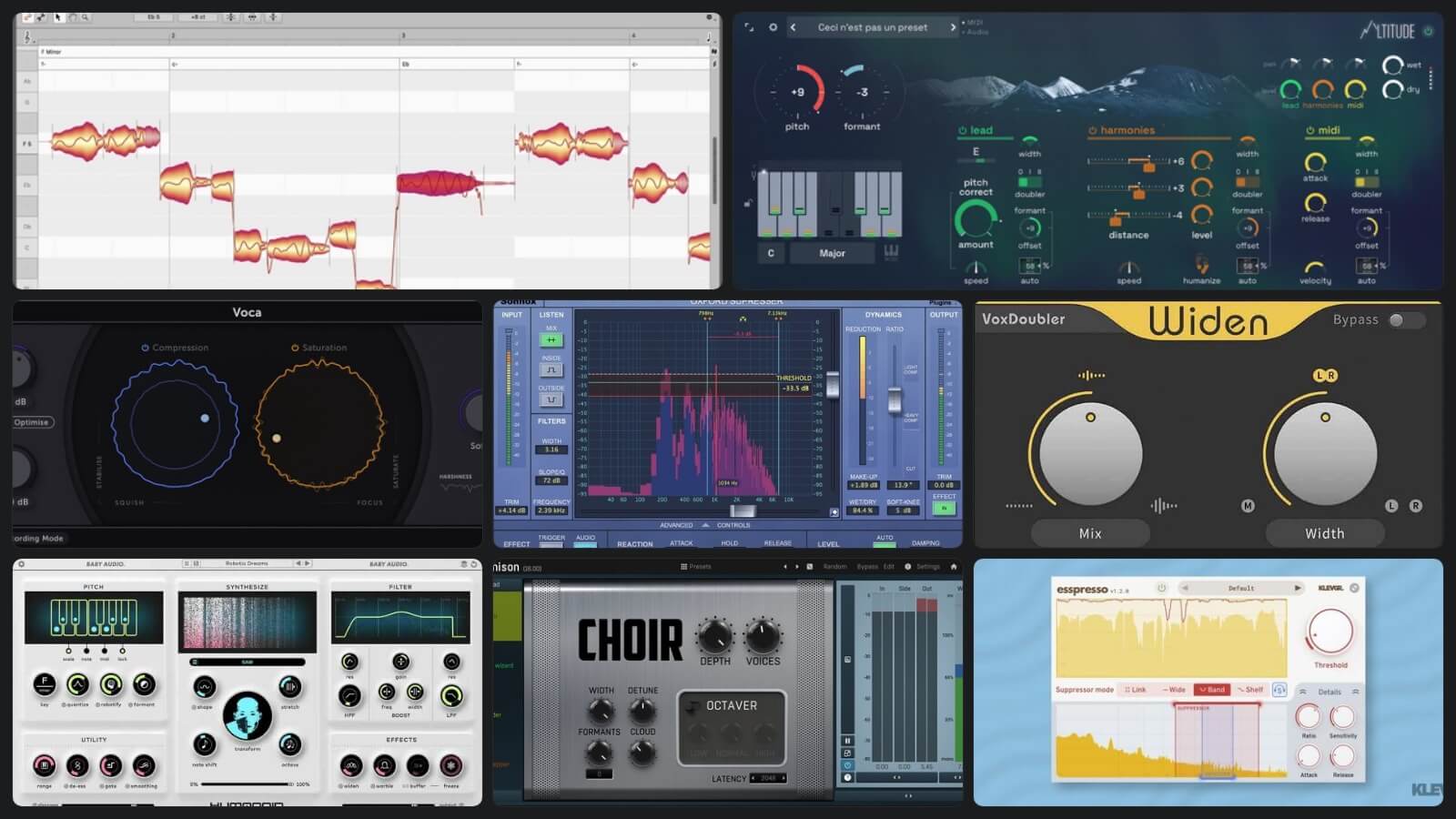
You record a vocal you’re happy with. In headphones it sounds close. Then you put it in the mix and it’s a little flat on the long notes, the S’s spit, and next to the guitars it sounds thin and a long way back.
That happens to everyone who records at home, and most of it can be fixed with what your DAW already has. A stock EQ, a stock compressor and a bit of patience go a long way. Where a vocal plugin earns its price is the job your DAW does badly: correcting single notes without making the singer sound like a robot, catching sibilance that comes and goes, or making one take sound like two.
The plugins below are grouped by that job. All the paid ones are on Plugin Boutique, every one has a free trial from either Plugin Boutique or the maker, and most are heavily discounted for Black Friday. If you’re new to vocal mixing, our compression for beginners and EQ for beginners guides cover the two tools you’ll use most.
Vocal Plugins at a Glance
Prices are from Plugin Boutique’s US store on 25 November 2026.
| Plugin | Job | List price | Black Friday price | Free trial |
|---|---|---|---|---|
| Melodyne 5 Celemony (Germany) | Correcting pitch and timing note by note | $99 to $698 (four editions) | $25 to $274 until 30 December | Yes, 30 days from Celemony |
| Altitude Klevgrand (Sweden) | Real-time tuning and harmonies | $149.99 | $79.99 until 10 December | Yes, from Klevgrand |
| Voca Sonnox (UK) | Levelling, compression and tone in one window | $112 | $29 until 17 December | Yes, from Sonnox |
| Oxford SuprEsser Sonnox (UK) | De-essing | $244 | $60 until 17 December | Yes, from Sonnox |
| Esspresso Klevgrand (Sweden) | De-essing on a budget | $59.99 | $29.99 until 10 December | Yes |
| VoxDoubler Sonnox (UK) | Doubling and widening | $89 | $23 until 17 December | Yes, from Sonnox |
| MUnison MeldaProduction (Slovakia) | Big unison stacks and choir-style harmonies | $109 | $37 until 1 January | Yes |
| Humanoid Baby Audio (USA) | Hard-tuned and robot vocals | $129 | $49 until 9 December | Yes, from Baby Audio |
| Graillon 3 Free Edition Auburn Sounds (France) | Free tuning and pitch effects | Free | Free | Not needed |
Before You Buy: What a Plugin Can’t Fix
When a home vocal sounds thin, the cause is usually already in the chain. Mixing guides and producers on music forums keep pointing to the same few things:
- The high-pass filter is set too high. Pull it down to around 80 Hz and listen for the body coming back.
- Too much compression. A few decibels of gain reduction is plenty on most vocals. More than that flattens the voice and brings up the room.
- Too many plugins. EQ, compressor, another EQ, saturation, more compression: each one takes a little off. Bypass the whole chain and compare.
- Reverb added too early. Reverb pushes a vocal further back. Get the dry sound right first.
If the raw recording is thin, harsh or noisy, start there: a different mic position, a softer room or another take will do more than any plugin in this list.
1. Celemony Melodyne 5: Pitch and Timing, Note by Note
Melodyne shows your vocal as a row of “blobs”, one for each note, sitting on a piano-roll grid. You drag a flat note up, shorten a held note, or move a late word forward, and Melodyne changes that note only. Nothing happens to the vocal until you ask for it.
That control is why it’s been the standard for natural-sounding correction for years. MusicRadar called Melodyne 5 powerful in every version, and Sound On Sound singled out two features added in version 5. The first finds sibilants (S, T and other noisy consonants) and keeps them out of pitch changes, which used to be a common source of glitchy, robotic edits. The second is the Leveling Macro, which evens out the volume of each note and which the reviewer found more transparent than a compressor.
The usual complaint is that detailed tuning takes time. Producers on music forums who compare it with automatic tuners such as Auto-Tune say Melodyne is the better tool for careful, note-by-note work, and the automatic tuners are quicker when you just want it to happen as the track plays. A few users report a slight change in the top end when audio passes through Melodyne; others hear none. Celemony’s 30-day trial is the way to find out on your own voice.
Which Melodyne Edition Do You Need?
This is the most common Melodyne question, and the editions differ only in features. All four use the same sound engine, and you can upgrade later by paying only the difference in list price.
| Edition | What it adds | List price | Black Friday price |
|---|---|---|---|
| Essential | Pitch, timing and length of each note, plus the pitch, timing and level macros. Single-note material only (vocals, bass, solo instruments, drums). | $99 | $25 |
| Assistant | Every vocal tool: vibrato, pitch drift, formants, fades, sibilants and note volume. Audio-to-MIDI export. | $248 | $75 |
| Editor | Editing single notes inside chords on piano, guitar and samples. More tempo and scale tools. | $398 | $174 |
| Studio | Several tracks in one window (useful for backing vocal stacks), the Sound Editor, matching timing to a reference track. | $698 | $274 |
Black Friday prices are on until 30 December.
For a lead vocal, Assistant is the edition most users settle on. Essential will fix wrong notes and timing, but the sibilant, formant and vibrato tools are missing, and those are what make careful edits sound natural. Editor only matters if you want to fix notes inside piano or guitar chords.
The Assistant, Editor and Studio offers arrive as two serial numbers: one for Essential and one for the upgrade. Register the Essential serial first, then the upgrade.
Price: Essential $99, or $25 until 30 December. Assistant $75, Editor $174 and Studio $274 until the same date. The trial is the full Studio edition for 30 days, and you can switch it to the smaller editions to compare them. See Melodyne 5 Assistant on Plugin Boutique
2. Klevgrand Altitude: Tuning and Harmonies as You Sing
Melodyne works after the recording. Altitude works while it plays. Put it on the track and it corrects pitch in real time with no latency, so a singer can hear the tuned voice in their headphones or use it on stage.
On top of the pitch correction sit up to three harmony voices that follow the key and skip notes that would clash, each with its own vibrato and humanizer so the stack doesn’t sound like three copies. There’s also a Play module that lets you play your voice from a MIDI keyboard, two doubler modes, and modulators for more experimental sounds.
It came out in 2026, so there are few long reviews yet. The German site Bonedo found the correction ranges from hard, Auto-Tune-style tuning to subtle fixes, and summed it up as a well-chosen combination of convincing sections rather than a reinvention of vocal processing. Klevgrand’s demo is the full plugin with occasional audio dropouts, so you can test it properly before buying.
Price: $149.99, or $79.99 until 10 December. Runs on Mac (Apple Silicon and Intel), Windows and iPad. See Altitude on Plugin Boutique
3. Sonnox Voca: A Vocal Chain in One Window
If your vocal chain has grown to six plugins and you’re not sure what half of them are doing, Voca is the answer to that. It puts automatic input levelling, compression modelled on the 1176 and LA-2A, saturation and a Soften control for harshness and sibilance into one screen with large, plain controls.
Tape Op’s reviewer, who mixes a lot of home-recorded vocals, found it evened out levels, softened cheap mics and made mixing faster. Two catches from the same review: on vocals already recorded through an expensive studio chain it made them a little smaller until the automatic levelling was switched off, and that levelling will undo section level changes you’ve made with clip gain. It doesn’t tune, and it has no reverb or delay, so you still need those elsewhere.
Price: $112, or $29 until 17 December. Needs a free iLok account (no dongle). Sonnox offers a free trial on its own site. See Voca on Plugin Boutique
4. De-Essers: Oxford SuprEsser and Esspresso
Sibilance is the hiss on S, T and SH sounds. It often gets worse as you mix, because compression and a bright EQ boost both bring it up. That’s why the usual starting point is a de-esser after the compressor. If the S’s are very strong, a light pass before the compressor as well helps.
Oxford SuprEsser is one of the de-essers engineers mention most. Its threshold floats with the singer’s level, so a whispered verse and a belted chorus both get treated without you riding the settings. You can listen to just the frequencies it’s working on, which makes finding the right band quick, and it also works as a dynamic EQ for boomy low end or harsh guitars. Sound On Sound called it an exceptional de-esser.
Price: $244, or $60 until 17 December. Sonnox offers a free trial. See Oxford SuprEsser on Plugin Boutique
Esspresso by Klevgrand is the simpler, cheaper choice. It listens on one frequency range and reduces another, which is the main thing you want from a de-esser, and the display shows how much it’s taking off. It’s $59.99, or $29.99 until 10 December, and Plugin Boutique has a free trial.
If you already own Melodyne Assistant or higher, its Sibilant tool can turn the S’s down note by note as well.
5. Sonnox VoxDoubler: Double a Vocal Without a Second Take
The best double is still a second take. A real singer never hits the same note at exactly the same moment twice, and those small differences are what make a doubled vocal sound big. Producers on music forums agree on that, and also agree that a doubler is the next best thing when the singer has gone home.
VoxDoubler is two plugins. Widen creates two new voices and pans them left and right of the original, for a wide chorus or backing vocals. Thicken lays a doubled voice on top of the original, closer to singing the part twice. Humanise knobs set how far the timing and pitch of the copies drift, and a Tone control stops the doubled S’s from piling up. Sound On Sound found it covers everything from a subtle double to a Lennon-style slapback, and liked it on electric guitar as well.
Price: $89, or $23 until 17 December. Sonnox offers a free trial. See VoxDoubler on Plugin Boutique
For something bigger, MUnison by MeldaProduction can stack up to 50 voices, either in unison or as harmonies that follow a scale you choose, which takes a single line towards a choir. It has far more controls than VoxDoubler, so expect to spend some time with it. It’s $109, or $37 until 1 January, with a free trial on Plugin Boutique, and it activates without a dongle or an internet connection.
6. Baby Audio Humanoid: When You Want It to Sound Tuned
Everything so far has been about hiding the processing. Humanoid goes the other way. Baby Audio’s own description says that if you want natural vocals, you’ve come to the wrong place.
It hard-tunes a voice to a key, or you can play the notes from a MIDI keyboard and turn one take into new melodies and harmonies. A wavetable synth follows the voice and can be blended in until the vocal becomes a synth, and there are Freeze, Warble and Widen effects for stutters and movement. A built-in de-esser and gate help the pitch detection on less-than-perfect recordings. It comes with 180 presets.
Price: $129, or $49 until 9 December. Baby Audio runs free trials from its own site. See Humanoid on Plugin Boutique
7. Free Vocal Tuning: Graillon 3 and MAutoPitch
If you only need light correction now and then, try a free tuner before spending anything.
Graillon 3 Free Edition from Auburn Sounds is the one most free-plugin lists put first. It does both natural and hard-tuned correction, formant shifting and pitch shifting, with a compressor, gate and chorus built in. The paid Full Edition ($29) adds a vocal doubler and keyboard tuning. It runs on Mac, Windows and Linux.
Price: free from Auburn Sounds.
MAutoPitch from MeldaProduction is an automatic tuner with formant shifting and stereo widening, free as part of Melda’s free effects bundle from meldaproduction.com.
Both work as the track plays, like Altitude, so neither can fix a single note the way Melodyne does.
Which Vocal Plugin Should You Buy?
- Your vocals are slightly out of tune and you want nobody to notice: Melodyne 5 Assistant.
- You only fix the odd note and the budget is small: Melodyne 5 Essential at $25, or Graillon 3 for free.
- You want tuning and harmonies live, or on stage: Altitude.
- Your chain has too many plugins and you want a good vocal fast: Voca.
- The S’s spit: Oxford SuprEsser, or Esspresso on a tighter budget.
- The singer has gone and the chorus needs to be bigger: VoxDoubler.
- You want the hard-tuned, robotic sound on purpose: Humanoid.
For harshness that only shows up on some notes, the dynamic resonance suppressor Smooth Operator Pro from our EQ plugins guide works well on vocals too. Sonnox also sells a Vocal Production Bundle of Oxford Inflator and Claro for $56 until 17 December; see our Oxford Inflator post for what Inflator does.
All of these deals are also listed on our Black Friday plugin deals page, which is updated as prices change.
Vocal Plugin FAQs
Melodyne Essential or Assistant: which should I get?
Assistant, if you can. Essential corrects pitch and timing, but it lacks the sibilant, formant, vibrato and fade tools that make detailed vocal edits sound natural. While the offer lasts, Assistant is $75 against Essential’s $25. If you start with Essential, the upgrade to Assistant is $49 until 30 December and $149 after that.
Is Melodyne better than Auto-Tune?
They do different jobs. Melodyne is for editing a recorded vocal note by note, after it’s recorded. Automatic tuners (Auto-Tune, Altitude, Graillon) correct as the track plays, which is quicker and is the only option for live use or the hard-tuned effect. Many producers own one of each.
Do I need Melodyne if my DAW has its own pitch editor?
Maybe not. Logic’s Flex Pitch and Cubase Pro’s VariAudio also let you edit pitch note by note, and for occasional fixes they may be all you need. Melodyne earns its place with its sibilant detection, the Leveling Macro, working the same way in any DAW, and (in Editor and Studio) editing notes inside chords. Try the trial on a vocal you’ve already tuned in your DAW and compare.
Where does the de-esser go in a vocal chain?
Tuning and timing fixes usually come first, before any compression. After that, a common order is EQ, compressor, de-esser, then saturation and effects, because compression brings sibilance up. If the S’s are very strong, a light de-esser before the compressor helps too. Check again after any bright EQ boost later in the chain.
Why does my tuned vocal sound robotic?
Usually the correction is too fast or too strong, the natural vibrato has been flattened out, or consonants and breaths are being tuned along with the notes. Slow the correction down, correct only the notes that need it, keep some vibrato, and leave S’s and breaths alone. Melodyne 5’s sibilant detection does the last part for you in Assistant and above.
Do these vocal plugins work in Pro Tools?
Yes. All the paid plugins here come in AAX format. Melodyne also links to Pro Tools, Logic, Cubase, Studio One and other ARA-compatible DAWs, so you can edit without transferring audio.
Which of these have a free trial?
All of them. Plugin Boutique has trials of Melodyne 5 Essential, Esspresso and MUnison. Celemony has a 30-day trial of every Melodyne edition, and Sonnox, Klevgrand and Baby Audio have trials on their own sites. Graillon 3 Free Edition and MAutoPitch are free.