Chord Prism 2 vs Scaler 3: The Short Answer
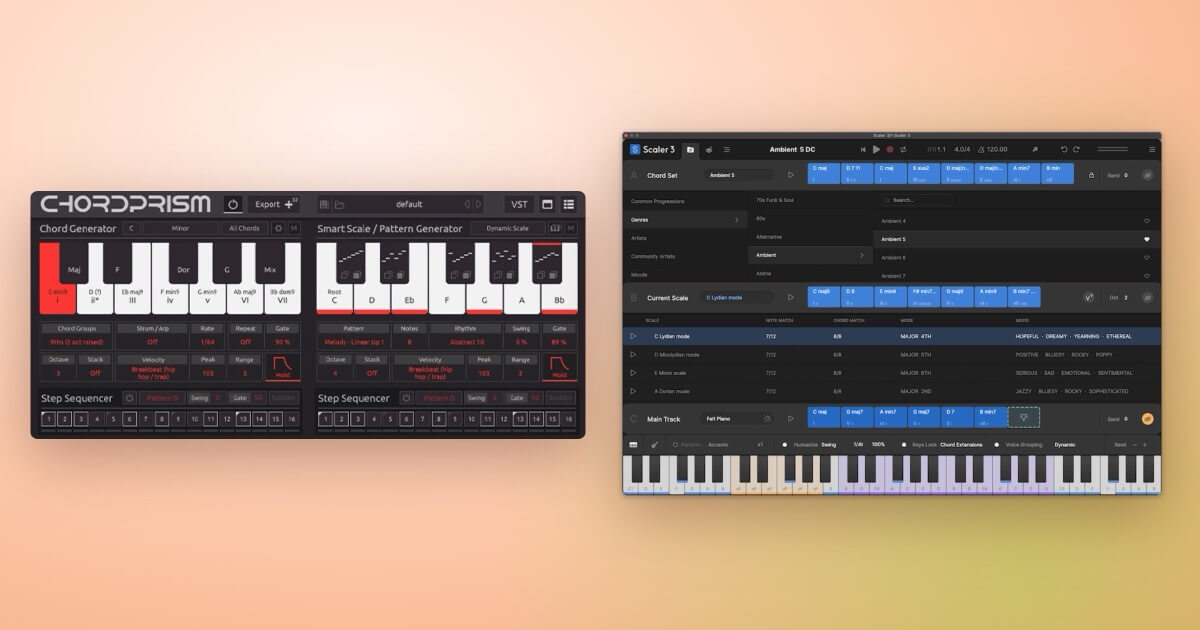
Both plugins help you write and play chords you couldn’t easily play by hand, and they overlap more than you might expect. Both can put a chord under each key on one side of your MIDI keyboard and turn the other side into notes that fit the chord. The difference is what each one is built around.
Chord Prism 2 by Mozaic Beats is built around playing. That split keyboard is the whole instrument, with arpeggio and melody patterns on the black keys, step sequencers and strumming, and several copies that stay in sync so you can play chords, bass and melody on different tracks.
Scaler 3 by Scaler Music is built around composing. It finds scales and chord progressions, detects the chords in MIDI or audio, suggests what could come next, and turns your progression into melodies, basslines and arpeggios with its Motions. Its Bind and Keys Lock features give you the same split keyboard, as one tool among many.
If you want help working out what to play, Scaler 3 is the stronger choice. If you mostly want to play chords and melodies with feel, Chord Prism 2 is the more direct tool, and it costs half as much.
Chord Prism 2 vs Scaler 3 at a Glance
| Chord Prism 2 | Scaler 3 | |
|---|---|---|
| Made by | Mozaic Beats | Scaler Music (Australia) |
| Current version | 2.2 (September 2026) | 3.3.2 (September 2026) |
| Price | $49.99 | $99, or $39 to upgrade from Scaler 1 or 2 |
| Free trial | 14 days (first 5 presets per category, no saving) | 14 days, all features |
| Main job | Playing chords, melodies and basslines live from a MIDI keyboard | Finding, building and arranging chord progressions |
| Built-in sounds | No. It sends MIDI to your instruments (or hosts one inside it) | Yes, 50, and it can host your own plugins |
| Chord library | Over 300 seven-chord presets, plus a free preset pack every month | Over 1,000 chord sets, keys and modes, including artist sets |
| Chord detection | Imports chords from a MIDI file | From MIDI and audio |
| Formats | VST instrument, plus AU and AAX MIDI effects | VST, VST3, AU, AAX and standalone |
| Works in Pro Tools? | Yes, as a MIDI insert | Yes |
| System | macOS 11.5+ (Apple Silicon native), Windows 10+, 16 GB RAM listed | macOS 10.14+ (Apple Silicon native), Windows 8+ |
| Where to buy | Plugin Boutique | Plugin Boutique |
Prices are from Plugin Boutique’s US store and version numbers from the makers’ own sites, checked in October 2026.
How Scaler 3 Works
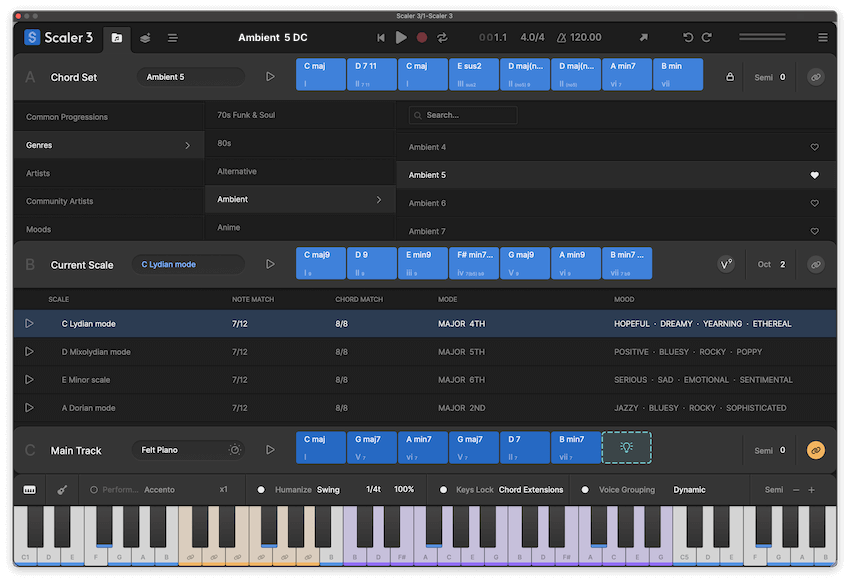
Scaler 3 is split into three pages.
- Browse: pick a chord set or a scale and drag chords into your progression, which Scaler calls the Main Track.
- Create: find new chords with the Circle of Fifths, change key with tools for secondary scales, modal interchange, mediants and Neo-Riemannian moves, explore chords sorted by genre and mood, and try voicing variations on the Colors page. The Sketch pad lets you compare up to seven progressions.
- Arrange: a multi-lane timeline where Motions turn your chords into arpeggios, strumming, basslines, melodies and phrases that follow the progression.
Suggest Mode offers chords or finishes a progression for you, and Auto Voice Leading smooths the movement between chords. The Detect feature reads a MIDI or audio file, or whatever you play into it, and shows the chords with matching scales. That makes it useful for working out the chords of a song you like.
You can play Scaler from your keyboard too. Bind puts a chord on each key (the white keys from C2 by default), and Keys Lock’s Chord Notes mode turns another area of the keyboard into the notes of the last chord you played, with the lowest note on C, so you can play a melody over the changes. Since version 3.3, Multi-Bind lets you play several tracks at once.
It comes as an instrument plugin, an audio-effect version for audio tracks (Scaler Audio 3) and a MIDI-effect version for Logic (Scaler 3 Control), plus a standalone app. Scaler 3 for iPad is sold separately on the App Store.
Updated since launch. Scaler Music has added a lot through free updates: Live Sync in 3.1; Scenes, Divisi, User Track recording and external MIDI out in 3.2; and Multi-Bind, a reworked Motion workflow, Detection History and new chord sets and bass Motions in 3.3. The current version is 3.3.2, released on 29 September 2026.
How Chord Prism 2 Works
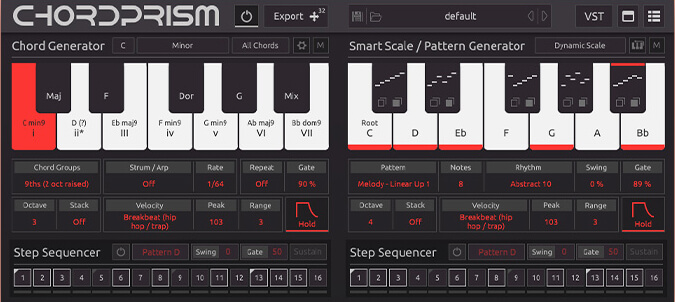
Chord Prism splits your MIDI keyboard in two.
- Left side, the Chord Generator: each white key plays a full chord from your chosen key and scale. The black keys shift the chord types, or the key and scale, on the fly.
- Right side, the Smart Scale: the white keys are filled with notes that fit the chord you’re holding. In the beginner mappings your hand stays in one place while the notes change under your fingers; the advanced mappings keep a normal keyboard layout.
- Right-side black keys, the Pattern Generators: each one plays its own arpeggio or melody pattern over the current chord.
On top of that you get strumming, chord repeats, step sequencers with four pattern slots each, and velocity patterns modelled on Afrobeat, house, dancehall and other drum styles. The Chord Editor lets you build any extended, altered or inverted chord note by note.
Instance Sync is the clever part. Load Chord Prism on several tracks and they all share the same key, scale and chord, so one instance can play the chords while others play a bassline and a melody that always fit.
Chord Prism makes no sound of its own. In most DAWs you send its MIDI to an instrument track; in GarageBand, Maschine, Reason, MPC Beats and Mixcraft you load an instrument inside Chord Prism instead. Version 2.1 added MIDI drag and drop, so you can turn your own chord MIDI files into playable presets, and you can drag up to 32 bars of what it played back into your DAW. The current version, 2.2 (September 2026), adds a reorganised preset library with all the free monthly packs already included, resizable windows, more Pattern Generator melodies and faster strum rates.
Chord Prism 2 vs Scaler 3: Head to Head
For Beginners
Both are built for people who don’t read music, in different ways. Scaler 3 teaches as you go: it shows which chords belong to a scale, colour-codes chords by how they relate to it, and has keyboard and guitar fretboard views plus a tutorial when you first open it. Chord Prism 2 lets you play straight away: with the beginner mappings you don’t need to know any theory to play chords and a melody that fit. The catch is setup. In some DAWs you have to route its MIDI to another track before you hear anything.
For Writing Progressions
Scaler 3 wins clearly. Its chord library, suggestions, modulation tools and chord detection are the core of the product. Chord Prism’s 300+ presets are good starting points, but it doesn’t suggest progressions or analyse songs.
For Playing and Performing
Both can turn your MIDI keyboard into chords on one side and safe notes on the other, so this comes down to how far each one goes. Chord Prism 2 is built for it: as well as the Smart Scale, the right-hand black keys trigger arpeggio and melody patterns, the step sequencers and strumming add rhythm, and you can choose mappings that keep your hand in one position while the notes change under your fingers. Scaler 3 covers the core of it with Bind and Keys Lock, and Multi-Bind lets you play several tracks at once, but its main focus is building progressions and arranging them on its timeline.
For Full Arrangements
Scaler 3 can build a whole arrangement inside the plugin, with several tracks, its own sounds and your plugins. With Chord Prism you build the arrangement in your DAW, using one instance per part.
Price and Value
Chord Prism 2 is $49.99. Scaler 3 is $99, or $39 if you already own Scaler 1 or 2. For a Scaler 2 owner the upgrade is the cheapest way into either.
Which Should You Buy?
Choose Scaler 3 if you:
- Want help finding chords and progressions, not just playing them
- Want to work out the chords of songs from MIDI or audio
- Like to build whole ideas inside one plugin, with its own sounds
- Already own Scaler 1 or 2 (the upgrade is $39)
Choose Chord Prism 2 if you:
- Have a MIDI keyboard and want to play parts with your own timing and feel
- Want to improvise melodies and basslines that always fit the chords
- Already have instruments you love and just need the chords and notes
- Want the lower price
Both have a 14-day free trial, so you can try them side by side before you pay. For more chord tools, including Melody Sauce 3 and InstaComposer 3, see our guide to the best chord and melody plugins. If you’re still on Scaler 2, our Scaler 2 guide for beginners covers what it does well.
FAQs: Chord Prism 2 vs Scaler 3
Is Chord Prism 2 free?
No. It costs $49.99. There’s a 14-day free trial from ChordPrism’s website. It gives you the first five presets in each category, but you can’t import extra preset packs or save your own presets until you buy.
Does Chord Prism 2 work in Pro Tools?
Yes. It includes an AAX MIDI effect that you load as a MIDI insert on an instrument track. Some store listings still say it isn’t compatible, but ChordPrism’s own setup guide covers Pro Tools.
Does Chord Prism 2 work in GarageBand?
Yes, according to ChordPrism’s setup guide. You load it as an instrument and host another instrument plugin inside it.
How many computers can I use Chord Prism 2 on?
Two. Your licence activates on up to two computers, and Chord Prism can run offline for up to 30 days before it needs to check in online.
Does Scaler 3 make sound on its own?
Yes. It has 50 built-in sounds, including pianos, synths and orchestral instruments, and it can also play your own instrument plugins.
Can Chord Prism 2 detect chords from audio?
No. It can import the chords from a MIDI file. Scaler 3 detects chords from both MIDI and audio.
How much is the Scaler 3 upgrade?
$39 on Plugin Boutique for owners of Scaler 1 or 2.
Is Scaler 3 available on iPad?
Yes, as a separate purchase on the App Store. Projects can move between the iPad and desktop versions.
Ready to Choose?
- Get Scaler 3 for chord discovery, detection and full arrangements.
- Get Chord Prism 2 to play chords, melodies and basslines live from your keyboard.