If you bought Scaler 2 a few years ago, you’ve probably had the emails. Scaler 3 is out, it’s on version 3.4 now, and the upgrade is cheap during Black Friday. If you’re new to Scaler, you may have found an old recommendation for Scaler 2 and wondered where to buy it.
Scaler 2 isn’t sold any more. Scaler 3 replaced it, and Scaler 2 owners can upgrade for much less than the full price. Whether you should depends on how you use it, because Scaler 3 does far more but takes longer to learn.
🎹 The Short Answer
- Want to buy Scaler 2? You can’t. Plugin Boutique now sends you to Scaler 3.
- Own Scaler 2 and use it every week? The Scaler 3 upgrade is worth it, especially at $29 until 7 December. Keep Scaler 2 installed too.
- Use Scaler 2 now and then for quick chord ideas? You can stay where you are. Scaler 2 still does that job.
- Only want to find the key of a song? Scaler Detector is now free.
📊 Scaler 2 vs Scaler 3 at a Glance
| Scaler 2 | Scaler 3 | |
|---|---|---|
| Can you buy it? | No, replaced by Scaler 3 | Yes. Current version 3.4 (November 2026) |
| Price | Upgrade path only | $99 ($69 until 7 December), or $39 to upgrade from Scaler 1 or 2 ($29 until 7 December) |
| What it’s built for | Finding chords and scales, detecting chords, building progressions | All of that, plus arranging whole ideas on a multi-lane timeline |
| Hosts your own plugins | – | Yes, VST and AU instruments and effects, plus 50 built-in sounds |
| Standalone app | – | Yes, with several tracks and plugin hosting |
| Formats | VST, AU, AAX | VST, VST3, AU, AAX and standalone |
| Free trial | – | Yes, on Plugin Boutique |
Prices are from Plugin Boutique’s US store on 11 November 2026.
💷 How Much Is Scaler 2 Now?
Scaler 2 has no price any more, because nobody sells it new. Plugin Boutique’s old Scaler 2 page now redirects to Scaler 3, and Scaler Music sells only Scaler 3.
What you can buy:
- Scaler 3: $69 until 7 December, normally $99. See our Scaler 3 deal post for the details.
- Scaler 3 Upgrade: $29 until 7 December, normally $39. It’s for anyone who owns Scaler 1 or Scaler 2.
If you already own Scaler 2, you don’t lose it when you upgrade. Plugin Boutique confirms the two are separate plugins and can be installed side by side.
✨ What Scaler 3 Adds
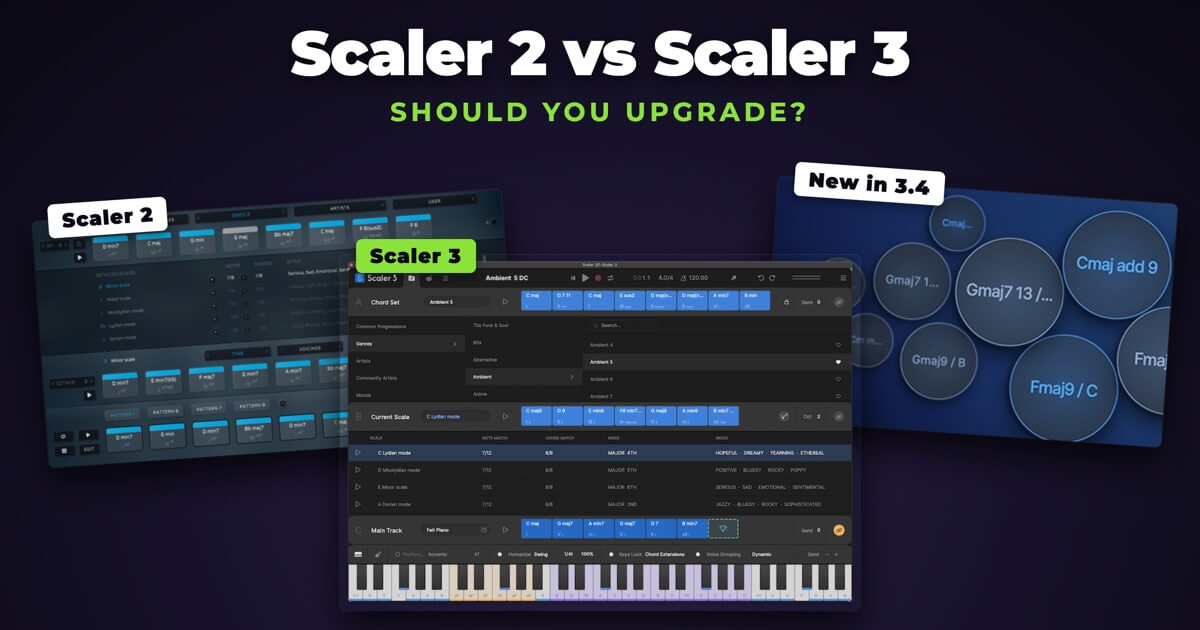
Scaler 2 already did the core job well. It detects chords from MIDI or audio, shows you scales that fit, offers chord sets by genre and artist, and lets you try different voicings, with keyboard and guitar views. Scaler 3 keeps all of that and builds a lot around it.
From progression to arrangement
- Arrange page: a timeline with separate lanes for chords, melody, bass and phrases, all following your chord track
- Motions: rebuilt performance patterns for arpeggios, melodies, basslines and phrases, sorted by mood, plus a new type called Passages
- Scenes: different versions of a progression for verse, chorus and bridge
- User Track recording: record your own melody into Scaler with chord and scale guides on screen
- Divisi and Bass Follow: split a chord’s notes between instruments, and get a bassline that follows the root notes
Sounds and hosting
- 50 built-in sounds, including pianos, synths and orchestral instruments
- Load your own instrument and effect plugins inside Scaler
- A full standalone app, so you can write without opening your DAW
- External MIDI out, and Live Sync to keep several copies of Scaler on the same chords
Harmony tools
- Explore page: chords grouped by feel (Bright, Dark, Neutral) rather than by scale
- Colors page: every voicing and substitution for a chord in one view
- Modulation Pathways: five ways to move into a new key, from modal interchange to Neo-Riemannian moves
- Sketch lanes: try alternative progressions side by side
Scaler Music has kept adding to it through free updates: Live Sync in 3.1; Scenes, Divisi and User Track recording in 3.2; Multi-Bind in 3.3, which lets you play several tracks from your keyboard at once.
🆕 New in Scaler 3.4
Version 3.4 came out on 11 November 2026, free for Scaler 3 owners. Most of it is about finding better chords, which is what many Scaler 2 owners bought Scaler for in the first place.
- Discover: press the Suggest icon and Scaler offers chords in three groups: ones that stay in your scale, ones borrowed from related keys, and more adventurous choices. A dice button gives you fresh ideas.
- Variations: hear any chord as an inversion, an open voicing, a guitar shape, or a drop 2 or drop 3 voicing, and edit single notes.
- 30 new Explore chord sets across 10 genres, including Neo Soul, Modal Jazz, Afro House, Melodic Techno, UK Speed Garage, Modern Film Score and Indie & Dream Pop.
- Sketch Lanes you can play on their own, fill with suggestions and send to the main progression.
- Voicing keyswitches, so you can change voicings from your keyboard while you play.
Scaler Music’s own walkthrough of the update (about 20 minutes):
🤔 What Scaler 2 Owners Miss
Not everyone who upgrades is happy straight away.
- It’s bigger. Scaler 3 has more pages, more lanes and more buttons. Sound On Sound rated it highly recommended, but its one drawback was that it’s deep and takes time to learn.
- Some jobs feel slower. Owners who use Scaler 2 for quick tasks, like grabbing a progression and dragging it into the DAW, say Scaler 2 is faster for that. One owner went back to Scaler 2 after two hours, and some keep both installed.
- Others don’t look back. Owners who build whole ideas inside Scaler like having several tracks in one copy, instead of loading Scaler on every track.
- It can use more of your computer. Chord work is light, but long arrangements with hosted plugins ask more of your processor.
So the upgrade suits you best if you want Scaler to do more of the writing. If you only use it as a chord dictionary, Scaler 2 still works.
For me, both versions have helped me through writer’s block and out of the three-chord loop. Scaler 3 has been worth the upgrade because it gives me a much wider choice of chords and ideas to try.
🔁 Upgrading: What Carries Over
- Scaler 2 stays. The two are separate plugins, so you can keep Scaler 2 for older projects.
- Your chord sets come with you. Use the import function in Scaler 3, or copy them from Scaler 2’s user sets folder.
- Older sessions: keep Scaler 2 installed so projects you made with it still open as you left them.
- More computers: a Scaler 3 licence activates on up to three devices.
🎓 Is Scaler 2 Still Good for Beginners?
If you already have it, yes. Scaler 2 shows you which chords belong together, names the chords in songs you like and gives you chord sets to start from. That’s what most beginners need.
If you don’t have it, you can’t buy it, so the choice is between Scaler 3 and something simpler. Scaler 3 has more to teach you and a tutorial overlay when you first open it, but expect a week or two before it feels comfortable. For other chord tools at different prices, see our best chord and melody plugins guide, or Chord Prism 2 vs Scaler 3 if you’d rather play chords than study them.
✅ Should You Upgrade to Scaler 3?
Upgrade if you:
- Use Scaler most weeks and want it to help with melodies, basslines and arrangements
- Want your own instruments and effects inside Scaler, or want to write without the DAW
- Want the new Discover and Variations pages for finding better chords
- Can upgrade before 7 December, while it’s $29
Stay with Scaler 2 if you:
- Mostly use it to look up chords and scales
- Prefer a simpler screen and a faster route back to your DAW
- Are happy with how it works now
Plugin Boutique has a free trial of Scaler 3, and Scaler 2 stays installed, so you can try both side by side before deciding.
❓ Scaler 2 vs Scaler 3 FAQs
Can I still buy Scaler 2?
No. Scaler 2 has been replaced by Scaler 3, and Plugin Boutique’s old Scaler 2 page now goes to Scaler 3.
How much is the Scaler 3 upgrade?
$39 for owners of Scaler 1 or 2, or $29 on Plugin Boutique until 7 December 2026.
Can I keep Scaler 2 after upgrading?
Yes. Scaler 2 and Scaler 3 are separate plugins and can be installed at the same time.
Do my Scaler 2 chord sets work in Scaler 3?
Yes. You can import them with Scaler 3’s import function or copy them from Scaler 2’s user sets folder.
Is Scaler 2 free?
No. But Scaler Detector, which finds the key, scale and chords of audio or MIDI, is now free, and it’s included with Scaler 3.
Does Scaler 3 work in Pro Tools?
Yes. It comes in AAX format, and it also runs as a standalone app.